
在本章中,我们将使用Arduino音调库。它只是一个Arduino库,可以在任意Arduino引脚上产生指定频率(50%占空比)的方波。持续时间可以有选择的指定,否则方波会一直持续到stop()函数被调用。该引脚可以连接到压电蜂鸣器或扬声器播放音调。
警告 – 不要将引脚直接连接到任何音频输入。电压远远高于标准线路电压,并可能损坏声卡输入等。你可以使用分压器来降低电压。
必需的组件
你将需要以下组件:
- 1 × 8欧姆扬声器
- 1 × 1k电阻
- 1 × Arduino UNO 板
程序
按照电路图进行连接,如下图所示。
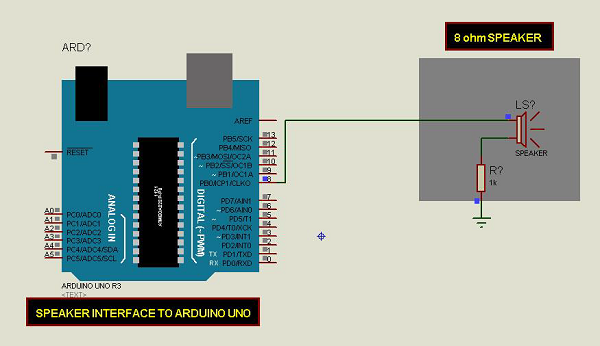

草图
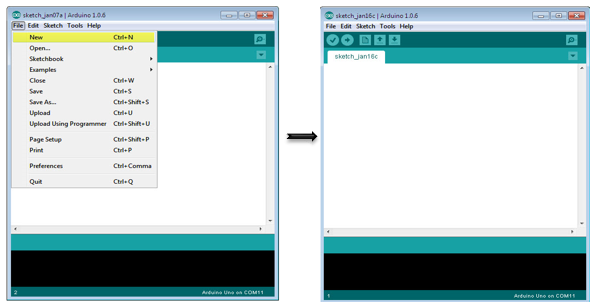
在计算机上打开Arduino IDE软件。使用Arduino语言进行编码控制你的电路。通过单击“New”打开一个新的草图文件。
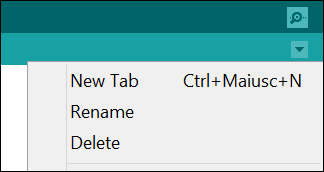
要制作pitches.h文件,请单击串口监视器图标正下方的按钮,然后选择“New Tab”,或使用Ctrl+Shift+N。
然后粘贴以下代码:
/*************************************************
* Public Constants
*************************************************/

#define NOTE_B0 31
#define NOTE_C1 33
#define NOTE_CS1 35
#define NOTE_D1 37
#define NOTE_DS1 39
#define NOTE_E1 41
#define NOTE_F1 44
#define NOTE_FS1 46
#define NOTE_G1 49
#define NOTE_GS1 52
#define NOTE_A1 55
#define NOTE_AS1 58
#define NOTE_B1 62
#define NOTE_C2 65
#define NOTE_CS2 69
#define NOTE_D2 73
#define NOTE_DS2 78
#define NOTE_E2 82
#define NOTE_F2 87
#define NOTE_FS2 93
#define NOTE_G2 98
#define NOTE_GS2 104
#define NOTE_A2 110
#define NOTE_AS2 117
#define NOTE_B2 123
#define NOTE_C3 131
#define NOTE_CS3 139
#define NOTE_D3 147
#define NOTE_DS3 156
#define NOTE_E3 165
#define NOTE_F3 175
#define NOTE_FS3 185
#define NOTE_G3 196
#define NOTE_GS3 208
#define NOTE_A3 220
#define NOTE_AS3 233
#define NOTE_B3 247
#define NOTE_C4 262
#define NOTE_CS4 277
#define NOTE_D4 294
#define NOTE_DS4 311
#define NOTE_E4 330
#define NOTE_F4 349
#define NOTE_FS4 370
#define NOTE_G4 392
#define NOTE_GS4 415
#define NOTE_A4 440
#define NOTE_AS4 466
#define NOTE_B4 494
#define NOTE_C5 523
#define NOTE_CS5 554
#define NOTE_D5 587
#define NOTE_DS5 622
#define NOTE_E5 659
#define NOTE_F5 698
#define NOTE_FS5 740
#define NOTE_G5 784
#define NOTE_GS5 831
#define NOTE_A5 880
#define NOTE_AS5 932
#define NOTE_B5 988
#define NOTE_C6 1047
#define NOTE_CS6 1109
#define NOTE_D6 1175
#define NOTE_DS6 1245
#define NOTE_E6 1319
#define NOTE_F6 1397
#define NOTE_FS6 1480
#define NOTE_G6 1568
#define NOTE_GS6 1661
#define NOTE_A6 1760
#define NOTE_AS6 1865
#define NOTE_B6 1976
#define NOTE_C7 2093
#define NOTE_CS7 2217
#define NOTE_D7 2349
#define NOTE_DS7 2489
#define NOTE_E7 2637
#define NOTE_F7 2794
#define NOTE_FS7 2960
#define NOTE_G7 3136
#define NOTE_GS7 3322
#define NOTE_A7 3520
#define NOTE_AS7 3729
#define NOTE_B7 3951
#define NOTE_C8 4186
#define NOTE_CS8 4435
#define NOTE_D8 4699
#define NOTE_DS8 4978
将上面给出的代码保存为 pitches.h
Arduino代码
#include "pitches.h"
// notes in the melody:
int melody[] = {
NOTE_C4, NOTE_G3,NOTE_G3, NOTE_GS3, NOTE_G3,0, NOTE_B3, NOTE_C4};
// note durations: 4 = quarter note, 8 = eighth note, etc.:

int noteDurations[] = {
   4, 8, 8, 4,4,4,4,4
};

void setup() {
   // iterate over the notes of the melody:
   for (int thisNote = 0; thisNote < 8; thisNote++) {
      // to calculate the note duration, take one second
      // divided by the note type.
      //e.g. quarter note = 1000 / 4, eighth note = 1000/8, etc.
      int noteDuration = 1000/noteDurations[thisNote];
      tone(8, melody[thisNote],noteDuration);
      //pause for the note's duration plus 30 ms:
      delay(noteDuration +30);
   }
}

void loop() {
   // no need to repeat the melody.
}
代码说明
代码使用一个额外的文件,pitches.h。此文件包含典型音符的所有音高值。例如,NOTE_C4是中央C。NOTE_FS4是F#,等等。这个注释表最初是由Brett Hagman编写的,tone()命令是基于它工作的。当你想制作音符时会发现它很有用。
结果
你会听到保存在pitches.h文件中的音符。
发布者:suiyublg,转转请注明出处:https://huibian.net/arduino%e5%a3%b0%e9%9f%b301-arduino-%e9%9f%b3%e8%b0%83%e5%ba%93/
