
Arduino教程22.Arduino If … else if … else语句

if 语句后面可以跟随一个可选的 else if … else 语句,其对于测试各种条件非常有用。

当使用 if … else if … else 语句时,请记住:

  • 一个 if 可以有0或一个else语句,它必须在所有else if之后。
  • if 可以有0到多个else if语句,它们必须在else之前。
  • 一旦 else if 成功,将不会测试剩余的else if或else语句。

if … else if … else语句

if (expression_1) {
   Block of statements;
}

else if(expression_2) {
   Block of statements;
}
.
.
.

else {
   Block of statements;
}

if … else if … else语句执行顺序
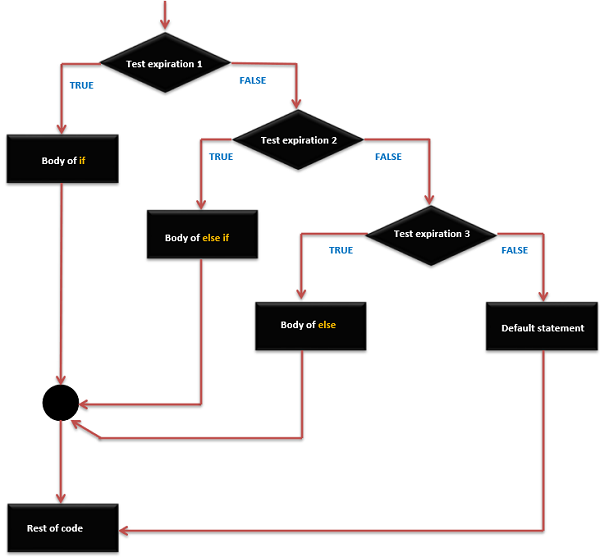
if ... else if ... else语句执行顺序

例子

/* Global variable definition */
int A = 5 ;
int B = 9 ;
int c = 15;

Void setup () {

}

Void loop () {
   /* check the boolean condition */
   if (A > B) /* if condition is true then execute the following statement*/ {
      A++;
   }
   /* check the boolean condition */
   else if ((A == B )||( B < c) ) /* if condition is true then 
      execute the following statement*/ {
      C = B* A;
   }else
      c++;
}

发布者:suiyublg,转转请注明出处:https://huibian.net/1008-5/

赞 (0)
suiyublg的头像suiyublg
上一篇 2017年3月24日 17:51
下一篇 2017年3月24日 17:55

相关推荐

  • Arduino教程15.Arduino 算术运算符

    假设变量A为10,变量B为20,则: 运算符名称 运算符简写 描述 例子 赋值运算符 = 将等号右侧的值存储在等号左边的变量中。 A = B 加号 + 两个操作两个操作数相加 A + B将得出30 减号 – 从第一个操作数中减去第二个操作数 A – B将得出-10 乘号 * 将两个操作数相乘 A * B将得出200 除号 / 用分母除…

    2017年3月23日
    67100
  • Arduino教程05.Arduino 数据类型

    C中的数据类型是指用于声明不同类型的变量或函数的扩展系统。变量的类型确定它在存储器中占用多少空间以及如何解释存储的位模式。

    下表提供了你将在Arduino编程期间使用的所有数据类型。

    2017年3月21日
    89903
  • Arduino教程32.Arduino millis()函数

    此函数用于返回Arduino板开始运行当前程序时的毫秒数。这个数字在大约50天后溢出,即回到零。 millis()函数语法 millis () ; 此函数从程序开始处返回毫秒。 例子 unsigned long time; void setup() { Serial.begin(9600); } void loop() { Serial.print(“Tim…

    2017年3月29日
    67000
  • Arduino项目07.Arduino 鼠标按钮控制

    使用鼠标库,你可以使用Arduino Leonardo,Micro或Due来控制计算机的屏幕光标。 这个特殊的例子使用五个按钮来移动屏幕上的光标。四个按钮是方向性的(上,下,左,右),一个是用于鼠标左键单击。来自Arduino的光标移动总是相对的。每次读取输入时,光标的位置都会相对于当前位置进行更新。 只要有一个方向按钮被按下,Arduino就会移动鼠标,在…

    2017年4月18日
    81400
  • Arduino项目04.Arduino LED条形图

    此示例展示如何读取模拟引脚0处的模拟输入,将analogRead()中的值转换为电压,并将其输出到Arduino软件(IDE)的串口监视器。 必需的组件 你将需要以下组件: 程序 按照电路图连接面包板上的组件,如下图所示。 草图 在计算机上打开Arduino IDE软件。使用Arduino语言进行编码控制你的电路。通过单击“New”打开一个新的草图文件。 1…

    2017年4月15日
    77100

发表回复

您的邮箱地址不会被公开。 必填项已用 * 标注

联系我们

400-800-8888

在线咨询: QQ交谈

邮件:admin@example.com

工作时间:周一至周五,9:30-18:30,节假日休息

关注微信
欢迎大家来到大雄学编程!