
这个例子演示了使用analogWrite()函数来渐变LED的功能。AnalogWrite使用脉冲宽度调制(PWM),以开和关之间的不同比率非常快速地打开和关闭数字引脚,以产生渐变效应。
必需的组件
你将需要以下组件:
- 1 × Breadboard 面包板
- 1 × Arduino Uno R3
- 1 × LED
- 1 × 330Ω 电阻
- 2 × 跳线
程序
按照电路图连接面包板上的组件,如下图所示。
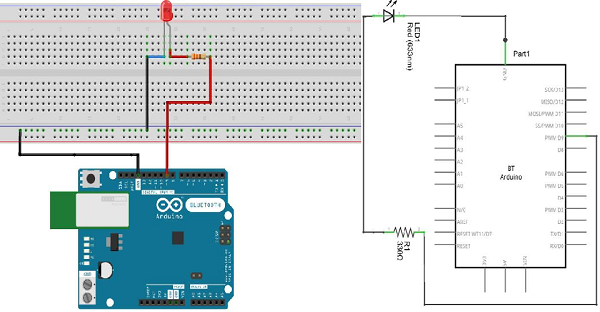

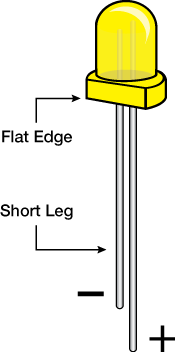
注意 − 要了解LED的极性,请仔细查看。两个腿中较短的,朝向灯泡的平坦边缘表示负极端子。
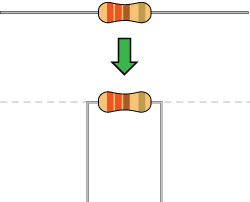
像电阻器这样的组件需要将其端子弯曲成90°角,以便恰当的适配面包板插座。你也可以将端子切短。
草图
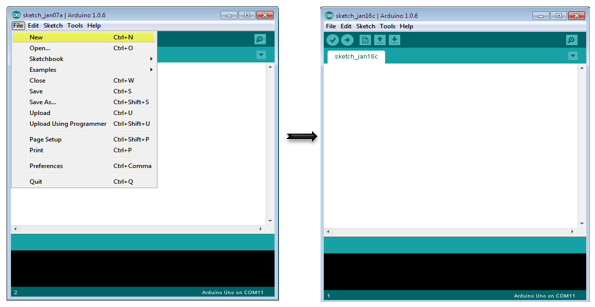
在计算机上打开Arduino IDE软件。使用Arduino语言进行编码控制你的电路。通过单击“New”打开新的草图文件。
Arduino代码
/*
   Fade
   This example shows how to fade an LED on pin 9 using the analogWrite() function.

   The analogWrite() function uses PWM, so if you want to change the pin you're using, be
   sure to use another PWM capable pin. On most Arduino, the PWM pins are identified with
   a "~" sign, like ~3, ~5, ~6, ~9, ~10 and ~11.
*/

int led = 9; // the PWM pin the LED is attached to
int brightness = 0; // how bright the LED is
int fadeAmount = 5; // how many points to fade the LED by
// the setup routine runs once when you press reset:

void setup() {
   // declare pin 9 to be an output:
   pinMode(led, OUTPUT);
}

// the loop routine runs over and over again forever:

void loop() {
   // set the brightness of pin 9:
   analogWrite(led, brightness);
   // change the brightness for next time through the loop:
   brightness = brightness + fadeAmount;
   // reverse the direction of the fading at the ends of the fade:
   if (brightness == 0 || brightness == 255) {
      fadeAmount = -fadeAmount ;
   }
   // wait for 30 milliseconds to see the dimming effect
   delay(300);
}
代码说明
将引脚9声明为LED引脚之后,在代码的setup()函数中没有任何操作。你将在代码的主循环中使用的analogWrite()函数会需要两个参数:一个告诉函数要写入哪个引脚,另一个表示要写入的PWM值。
为了使LED渐变熄灭和亮起,将PWM值从0(一直关闭)逐渐增加到255(一直开启),然后回到0,以完成循环。在上面给出的草图中,PWM值使用称为brightness的变量设置。每次通过循环时,它增加变量fadeAmount的值。
如果brightness处于其值的任一极值(0或255),则fadeAmount变为负值。换句话说,如果fadeAmount是5,那么它被设置为-5。如果它是-5,那么它被设置为5。下一次通过循环,这个改变也将导致brightness改变方向。
analogWrite()可以非常快速地改变PWM值,因此草图结束时的delay控制了渐变的速度。尝试改变delay的值,看看它如何改变渐变效果。
结果
你应该看到你的LED亮度逐渐变化。
发布者:suiyublg,转转请注明出处:https://huibian.net/1402-2/
